01The submitted identifiers
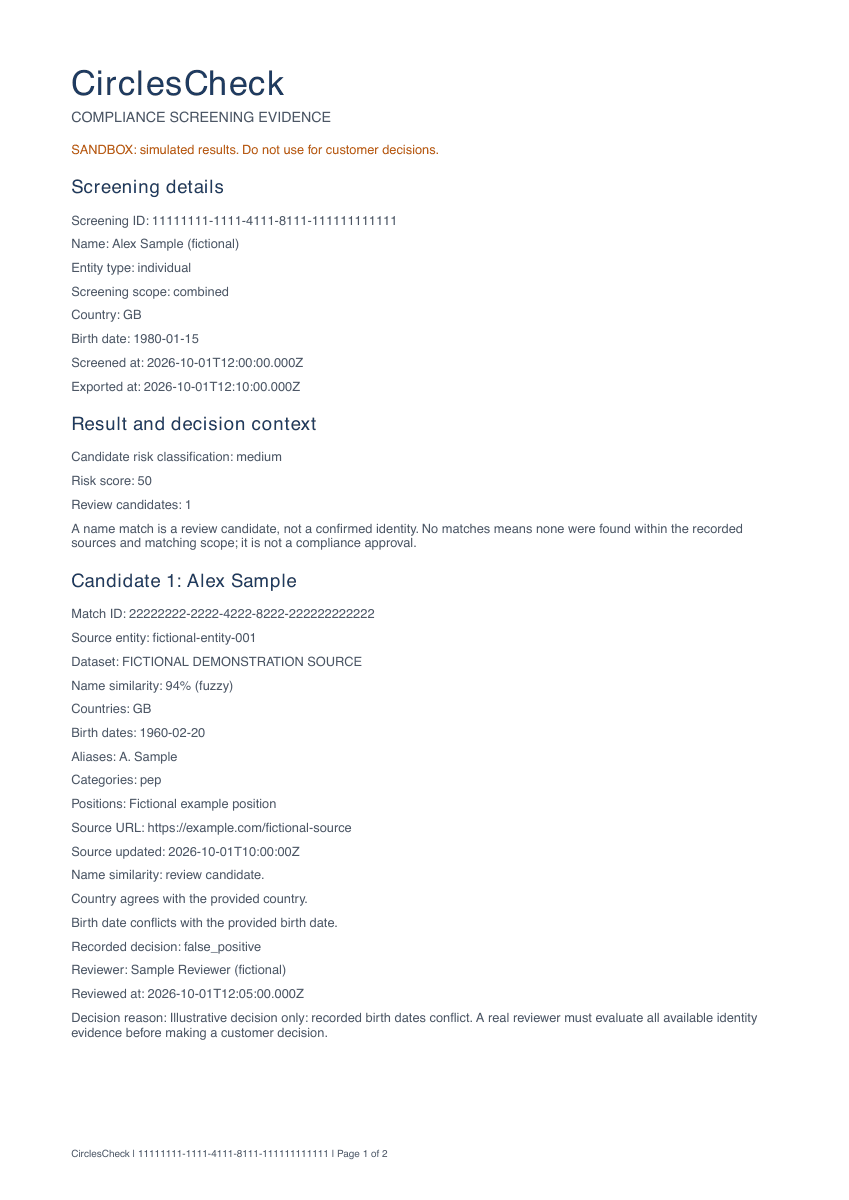
The screening UUID, customer name, entity type, birth date, country, screening scope, and screening/export timestamps identify the check. The example uses Alex Sample, born 1980-01-15, GB.
CirclesCheck · Screening evidence
Export the completed screening, returned source evidence, and recorded reviewer assessment in a PDF your team can inspect.
Download the sample report ↓Fictional demo data. The sample is an example of the report structure, not a customer screening or a compliance approval.
Read the record
The screening UUID, customer name, entity type, birth date, country, screening scope, and screening/export timestamps identify the check. The example uses Alex Sample, born 1980-01-15, GB.
Returned candidates can include dataset, source entity, name similarity, aliases, dates, countries, identifiers, source links, and matching reasons where available. Compare the actual identifiers; a similarity score is not an identity decision.
Where your team has saved a disposition, the report includes that decision, the reviewer, review time, and notes. Unreviewed candidates remain identified as awaiting review.
The report includes the recorded engine, snapshot time, freshness evidence, and limitations when available. Missing timestamps are described as unknown or not recorded; historical checks may have less evidence.
The fictional example compares a customer born in 1980 with a candidate born in 1960. The reviewer records the observed conflict and a false-positive disposition; the PDF preserves that assessment.
A report reflects the evidence and decisions recorded at export. Define your team's review, retention, and follow-up requirements before using it in your process.
Read the match review API →
Replace SCREENING_UUID with the UUID returned by your own completed screening, and use your API key. The endpoint returns application/pdf.
A pending or failed screening returns HTTP 409 instead of a completed evidence report. Sandbox reports are labelled simulated and must not be used for real customer decisions.
Check response and error handling →curl 'https://api.circlescheck.com/api/v1/screenings/SCREENING_UUID/report' \
-H 'Authorization: Bearer cc_test_your_api_key' \
--fail --output screening-report.pdfThe PDF documents a completed check. Paid monitoring adds subsequent checks of customers on your watchlist, with new candidate findings available for review.
Estimate a monitoring allowance →Inspect the sample with the people who review matches and retain customer records. Confirm the fields, sources, reviewer attribution, and limitations your workflow requires.
Discuss your evidence requirements →Create a test screening, record a reviewer assessment, and export the PDF. Compare the result with your team's requirements before selecting a production plan.
Prepared by CirclesCheck · Updated . Product evaluation guidance; independent regulatory review is not claimed.